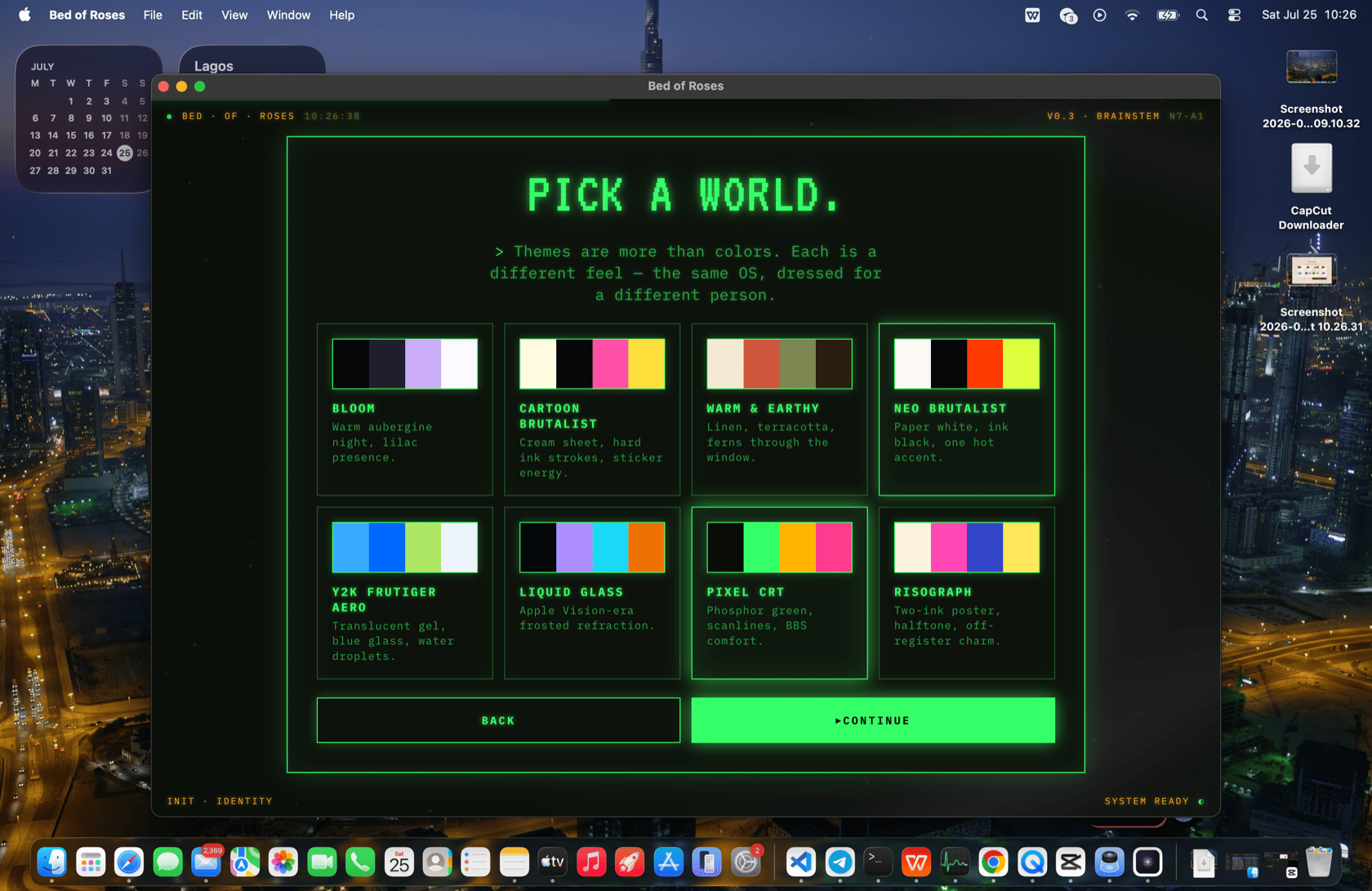
Themes
Themes restyle everything — the presence orb, the thought bubble, every card, and every surface BOR generates. A theme is a complete identity: a palette, fonts, border style, wallpaper, and a handbook that tells the AI how to design within it. You change themes just by asking.Changing the theme
“Make it feel like a glossy 2000s aqua desktop.”BOR sets the matching theme (
y2k-frutiger), optionally generates a matching wallpaper, may set fonts, and restyles the presence and all surfaces. Tools:
set_theme— set the theme, and optionally a wallpaper and fonts.reset_theme— return to the default.
set_theme can carry:
- a
<wallpaper>— eitherfrom_prompt="…"(BOR generates an image), a literalurl="…", or a CSS background string. <fonts display="…" system="…" mono="…">— typography overrides.<atmosphere>— ambient styling.
The v2 presence themes
The v2 presence ships ten full themes, each with its own token set (palette, accent, fonts, border/radius style):| Theme | Identity |
|---|---|
cartoon-brutalist | Light cream, thick black borders, hot-pink accent, playful. |
neo-brutalist | Stark white/black, hard edges, red-orange accent. |
liquid-glass | Dark, glassy, translucent, pink/lilac accent, serif display. |
pixel-crt | Black background, green phosphor text, monospace — a terminal. |
risograph | Cream paper, navy ink, riso pink, serif display. |
y2k-frutiger | Glossy aqua/sky-blue, white, Frutiger Aero. |
warm-earthy | Warm cream/tan, brown ink, terracotta accent, serif. |
cyberpunk | Dark, neon magenta + cyan, techno display. |
memphis | Bright white, bold pink + mint, playful geometric. |
solarpunk | Cream + forest green, organic, serif display. |
data-theme from config and applies the right token block. These same themes drive the look of the MCP marketplace window, which mirrors whichever theme you’re on.
Theme handbooks (design guidelines)
A theme isn’t just CSS — it’s a handbook the AI must read before generating a surface for that theme. The handbooks live indesign-guideline/<theme>.md (and the classic shell has many more theme handbooks under shell/themes/). The handbook is the canonical contract: palette, type scale, spacing, components, motion, and the dos/don’ts that keep a generated surface on-brand.
This is enforced by the design gate: before the first create_app/create_shortcut/update_* in a turn, BOR must call get_ux_ui_strict_guidelines, which returns:
- the strict shortcut-card spec (
design-guideline/shortcut-card.md), - the app icon kit (
UX_app_icons_and_thumbnails.html), - the active theme’s handbook.
The default aesthetic
BOR’s default aesthetic is strict, Apple-grade black & white — no emojis, no gradients, no color in core UI. The named themes above are deliberate, opinionated departures from that default; within a theme, BOR follows that theme’s identity (which may be very colorful). The design skill is run before any UI redesign.Wallpapers
When a theme calls for it, BOR generates a wallpaper with the image tool and applies it as the macOS desktop wallpaper (best-effort, via the host). Generated wallpapers are saved underos-data/.../images/ and the applied one under os-data/v2-wallpaper/.
Per-theme user extras
Each theme has auser-extras.css (one of the few files in the source tree BOR is allowed to write). It’s the AI’s canvas for “I want a sticker on the homepage” or “a clock in the corner” — small decorative additions that persist for that theme without touching the OS source.
Tools
| Tool | Purpose |
|---|---|
set_theme | Set theme + optional wallpaper + fonts + atmosphere. |
reset_theme | Return to the default theme. |
set_ai_name | Rename the presence. |
create_svg | Place a vector graphic / decorative item. |